[ For site work and home projects ]
Site inspections, done on site.
Photograph it. Mark it up. Get the report out. From a new-home snag list to a busy building site, keep every issue and next step together.
Free forever · No credit card · Upgrade when you're ready

- Platforms
- iOS · Android · Web
- Works
- Offline-first
- Free tier
- £0
Interactive sample project
Riverside House
Final inspection
Check the fire door closer
In ProgressWindows sealed
CompletedStair rail secured
CompletedNo issues with this status
Try the status filters or tick the checkbox to complete an issue.
Sample data · Changes here are not saved.
[ What it does ]
Built for site work.
Draw on photos
[ 01 ]Circles, arrows, freehand. Mark exactly what's wrong, right there on the photo. It all carries through to the PDF.
One-tap PDF reports
[ 02 ]Your logo, your photos, your annotations. Structured, clean, ready to email. Multiple themes to choose from.
Works without signal
[ 03 ]Basements, rural sites, thick walls — everything works offline. Syncs the moment you get a connection.
Bring your team
[ 04 ]Share a link or a QR code. Everyone sees the same projects on their own phone and on the web dashboard.
Track what matters
[ 05 ]Priority levels, assignees, filters, bulk updates. You always know what's done and what isn't.
Share with clients
[ 06 ]Send them a link. They see the project in their browser — issues, photos, progress. No app needed on their end.
[ The app ]
Native on your phone. Full dashboard on the web.
Capture issues on iOS or Android, then review, organise, and share your work from the web dashboard.
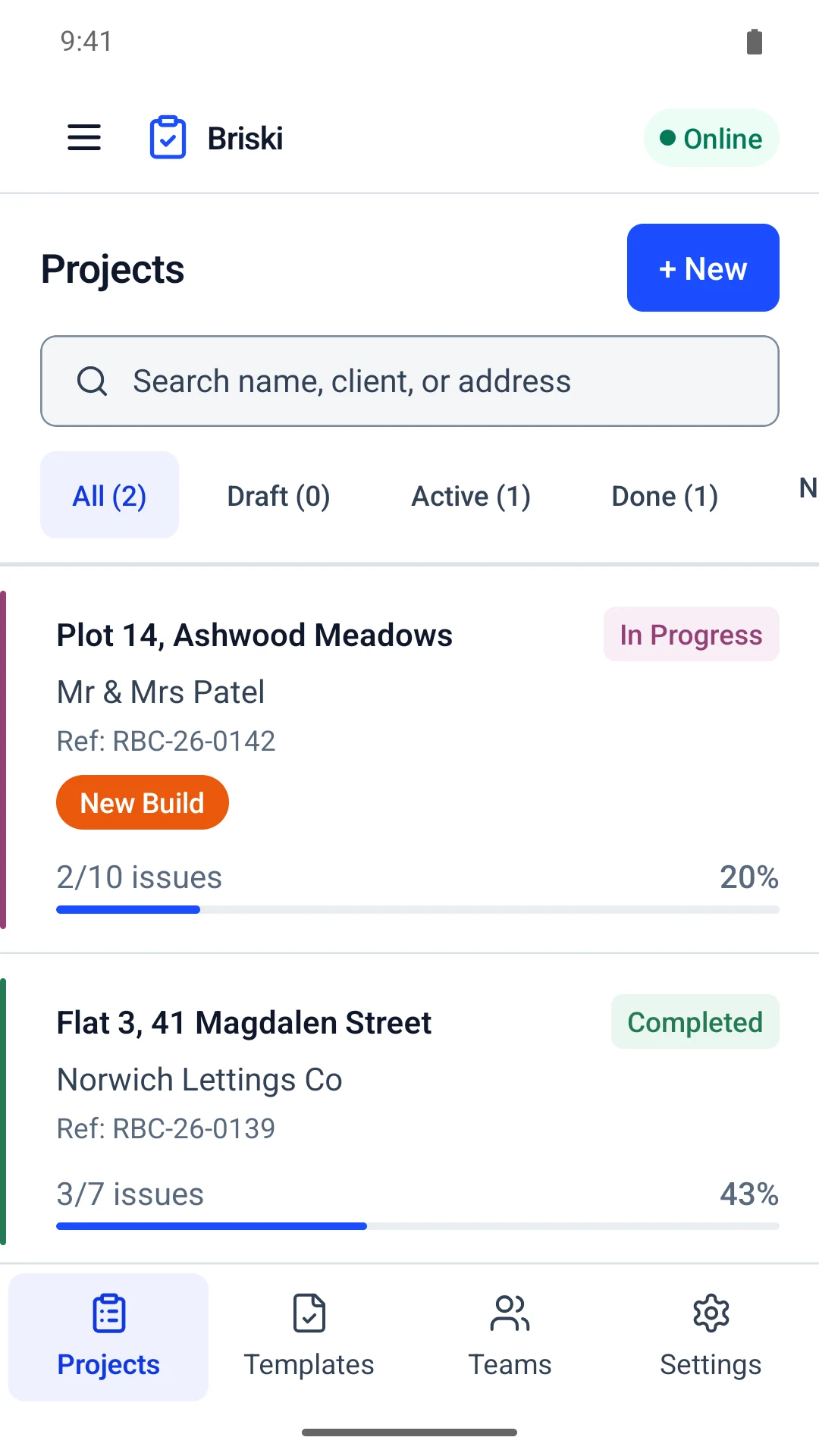


[ 01 / 06 — Projects ]
Every job at a glance — status, progress and who it's for.
[ 02 / 06 — Snag list ]
Priority, trade and location on every issue. Tick them off as they're fixed.
[ 03 / 06 — Issue ]
Photograph it, describe it, assign a trade and a due date.
[ 04 / 06 — Photo ]
Full screen, pinch to zoom. Share or bin it from here.
[ 05 / 06 — Annotate ]
Arrows, pen and text straight onto the photo. No argument about which crack.
[ 06 / 06 — Report ]
Three PDF layouts. Your logo, your signature, thirty seconds.
Your inspection. Your checklist.
Add the items that matter to your project, then capture photos, notes and progress in one place. Start with a reviewed visual checklist for room finishes, kitchens and bathrooms, or a property condition record. Specialist inspection templates remain under review.
Explore visual checklists →[ How it works ]
Four steps, start to report.
Start a project
Title, address, client name. Takes thirty seconds from your phone.
Capture everything
Walk the site. Photograph issues. Draw on the photos. Set priority. Works with or without internet connection.
Generate the report
One tap. Branded PDF with your logo, photos, annotations, and notes.
Or go deeper
The web dashboard lets you assign issues, track progress, export CSV, and share a live link with the client.
[ At home, too ]
Your home. Your snag list.
Checking a new home, renovating a room or working through repairs? Keep photos, notes and what needs fixing in one place. Send a clear report to your builder and tick things off as they’re sorted.
Start your snag list free →- New-home handover
Record the finishing touches that still need attention. - Renovations
Keep a room-by-room list for you and your tradespeople. - Repairs and maintenance
Remember the small jobs before they become big ones.
Start with 3 active projects for free. Solo adds unlimited projects, the full web app, cloud sync, your own report branding and 20 GB of photo storage for £4.99/month.
[ Pricing ]
Just you. Or your whole team.
Start free, choose Solo for yourself, or choose a subscription for your team. Only the team owner pays — everyone else joins free.
Free
Just you. Every feature, 3 projects at a time.
Start freeNo card. No time limit.
- 1 person
- 250 MB cloud photo storage
- 3 active projects, unlimited issues
- Photos, annotation, templates
- PDF reports with a small Briski footer
- iPhone, Android and web
Solo
Work on your own. No limits.
Start free, upgrade when readyCancel anytime
- Everything in Free
- Unlimited projects
- 20 GB cloud photo storage
- The full web app, not just mobile
- Sync across your phone, tablet and laptop
- Your logo on reports, no footer
Teams
Up to 5 people. One bill.
Start free, upgrade when readyCancel anytime
- Everything in Solo
- Up to 5 people, members join free
- Shared projects — everyone sees the same job
- 100 GB cloud photo storage
- Client portal links
- Roles and permissions
Bigger outfits
Business
Up to 20 people. Still one bill.
Start free, upgrade when readyCancel anytime
- Everything in Teams
- 500 GB cloud photo storage
- Up to 20 people
- Priority support
Enterprise
Up to 100 people. One bill, one invoice.
Start free, upgrade when readyCancel anytime
- Everything in Business
- 2 TB cloud photo storage
- Up to 100 people
- More than 100? Email hello@snagger.pro
[ FAQ ]
Common questions
Unlimited audits, up to 3 active projects, and PDF reports with a small Briski footer. Solo (£4.99/month) removes the project limit and footer, adds the full web app and cloud sync, and lets you add your own logo. Choose Teams if you also need team collaboration and more storage.
Yes. The native apps handle everything offline — create projects, capture issues, annotate photos, generate PDFs. Everything syncs automatically when you're back online.
Yes. The app is free to download and the Free plan has no time limit: photos, annotation, templates and PDF reports, 3 projects at a time, just for you. Solo is £4.99/month (or £49.00 a year) for unlimited projects, the full web app, cloud sync and your own report branding, with 20 GB of photo storage for one person. Teams (£19.99/month, up to 5 people), Business (£59.99/month, up to 20) or Enterprise (£149.00/month, up to 100) adds shared projects, more cloud storage and the client portal.
Share a link or a QR code. Members join free — only the team owner pays. Teams covers 5 people, Business 20, Enterprise 100, and if you're bigger than that, email hello@snagger.pro and we'll sort you out.
Yes. Share a link and they can view the project, issues, photos, and progress in their browser. No app or account needed.
With Solo or a team subscription, upload your logo once and it appears on every PDF. You can also add a signature and choose from multiple report styles.
Me — I'm the developer. There's a support centre in the app and on the web. You send a message, I read it and reply personally.
[ Get started ]
Get your next inspection moving.
Create an account, start a project, and see how it works. Free forever — upgrade to Teams when you're ready.
No card required. Solo from £4.99/month.